The tension behind a simple screen
Progressive disclosure can make a complex task feel manageable by showing detail when it becomes relevant. But a smaller first screen is not automatically easier. If a necessary option disappears behind an unclear label, the interface has reduced visible complexity by moving the burden onto the person.
The useful question is not “How much can we hide?” It is “What does someone need to recognize now, and how will they find the rest?” That distinction matters in scheduling, where a familiar daily routine and an unusual repeating rule can belong to the same product.
An illustrative crowded form
Imagine a reminder form that opens with frequency, interval units, weekdays, cycle length, intake count, time and notification settings all expanded. Every rule is available, but a person setting one daily reminder must first decide which fields to ignore.
This is an authored comparison, not a claim about an earlier MyTherapy interface. Its weakness is the absence of a meaningful first decision. Several controls may be individually clear while the overall task still lacks a recognizable starting point.
What the supplied screens show
The supplied MyTherapy frequency export starts with familiar choices: once daily, twice daily, as needed and “I need more options…”. The advanced export groups multiple daily intakes, intervals, weekdays and cyclic mode. These are observable interface structures, not measured usability outcomes.
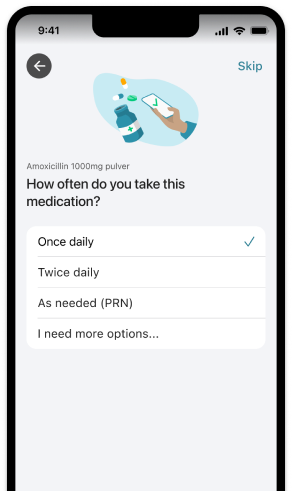
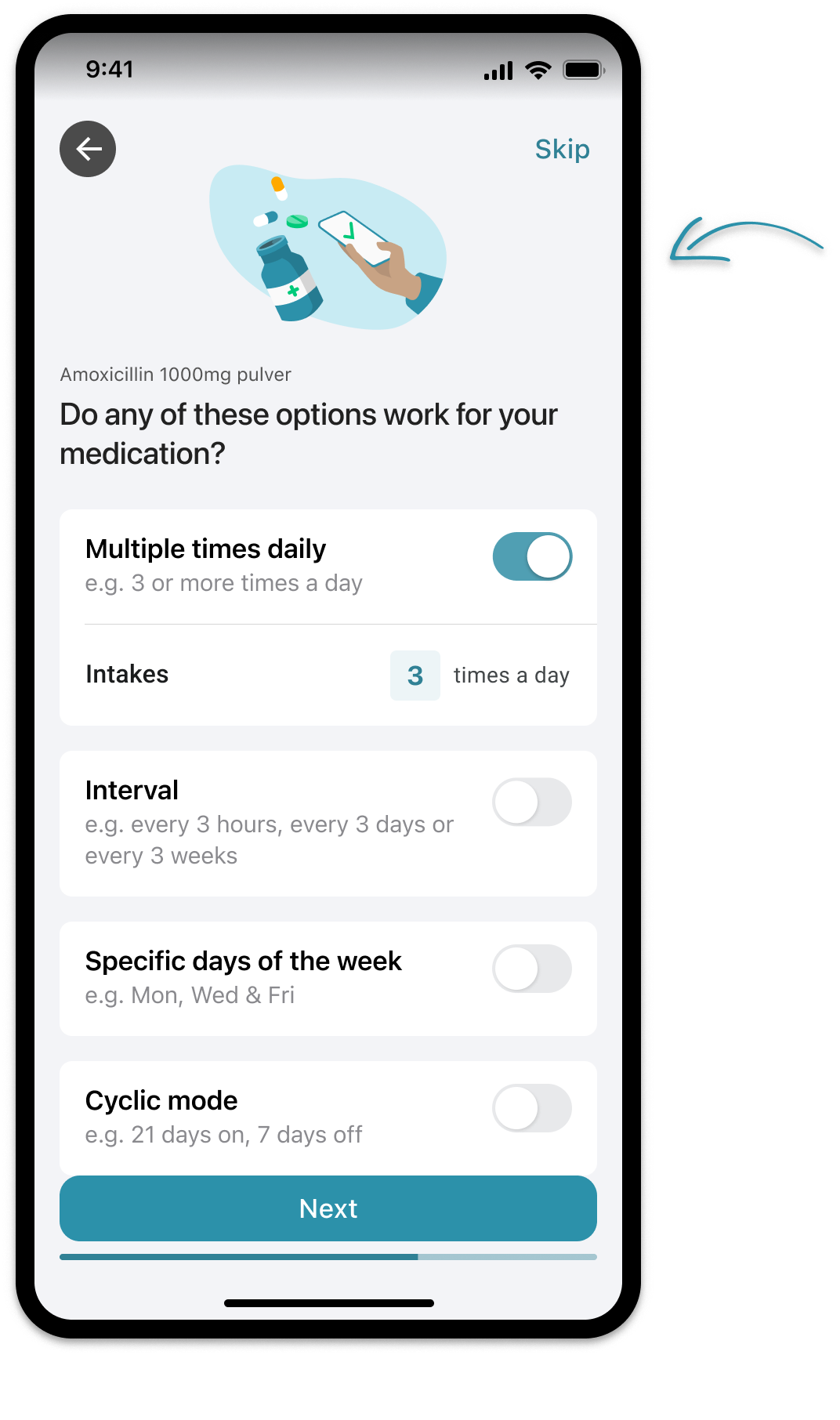
The grouping follows a person’s idea of a routine before asking them to understand the whole schedule model. That is the design value of the structure. Whether the wording and route work for the intended people still needs evidence.
Keep the hidden path recognizable
An advanced option must communicate enough to be recognized by someone who needs it. A generic menu icon is not an adequate replacement for a visible path. “More options” is a starting point, but a design review should ask whether people understand what kind of options it contains.
Detail should appear near the choice that makes it relevant. If enabling a rule changes a control far away, the relationship is harder to follow. The advanced export keeps the intake count under its daily-intakes option. Examples also help distinguish rules before configuration begins.
The aim is relevance, not secrecy. Essential state, selected values and the possibility of editing should remain visible. Explanations that are rarely needed can sit behind a disclosure, but the person should not have to open every section to understand what they have chosen.
Design the return journey
A setup flow is incomplete without its return journey. Can someone go back without losing entered information? Can they find a saved rule and change one part? Does changing the frequency affect times or other settings, and is that consequence explained before confirmation?
A readable summary can preserve control across the stages. It should express the actual choice rather than collapse it into “custom schedule.” Editing should connect back to the relevant rule, not silently restart the entire setup. These are proposed review criteria; the supplied screenshots do not demonstrate the complete edit journey.
Review more than the default path
- Can a first-time person find the advanced rule they need?
- Can someone explain the selected schedule from its summary?
- Does going back preserve time, frequency and other entered values?
- Are selected states, newly revealed controls and errors accessible?
- Can a frequent editor change one detail without redoing everything?
The source narrative reports confusion around recurrence and difficulty editing reminders. Without participant counts or study records, those remain source-reported themes. They are useful questions for further review, not evidence that the visible design solved every problem.
Limits and transferable lessons
The lesson is to separate what must be recognized from what must be configured. Show enough to make the path understandable, reveal detail in context and preserve a way to inspect and change the result. The balance can differ for a novice, an expert or someone using assistive technology.
This article discusses interface design, not medication choices or health effects. It makes no claim about retention, error reduction or medical effectiveness. Real usability checks and confirmed implementation behavior would still be needed to evaluate the complete interaction.
Read the full MyTherapy caseSources and scope
The supplied MyTherapy exports and project narrative are the source of the screen observations. Microsoft HAX and Google PAIR offer related guidance about making capabilities and control understandable in AI-assisted systems. Their application here is an editorial comparison; the scheduler is not presented as an AI product.
Voice and examples await Oksana’s review. This article presents design reasoning, not a claim of measured performance or a client study.
Back to the journal